Visualizing Claude's Brain
Here's a thing nobody tells you when you start using a coding agent: most of the time, when the agent does something dumb, it isn't because the model is dumb. It's because the agent didn't know something it needed to know — and it didn't know it because you never put it in front of it.
An agent is a model plus a context plus a loop. The model is fixed — you don't get to retrain it. The loop is mostly handled for you. The one lever you actually hold, the one that decides whether the agent is brilliant or useless on your particular codebase, is the context: the pile of text the model gets to read before it writes a single line of code.
And with Claude Code, that pile is bigger and stranger than you'd guess. It isn't one file. It's a dozen of them, scattered across ~/.claude/, a hidden ~/.claude.json, and a .claude/ folder buried in your project — global instructions, memories, settings, rules, MCP registrations, slash commands, subagents, skills, hooks. They load in a specific order. Some become text the model reads. Some quietly reconfigure the harness around the model and never appear in the prompt at all. Most people have no idea which is which, or what's even present.
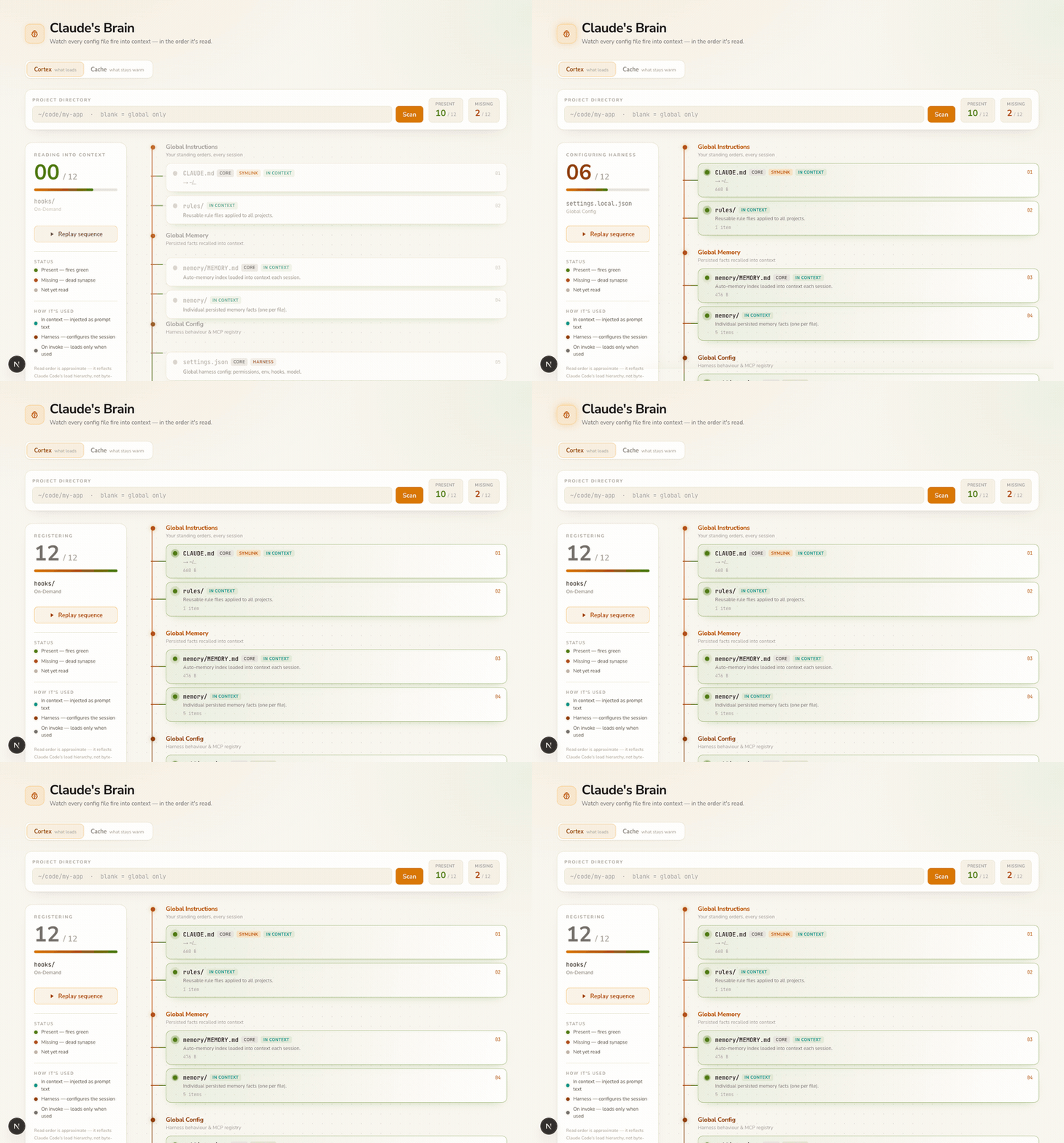
So I built a small local dashboard to make all of it visible. It's called Claude's Brain, and the main view is a thing I call the Cortex: every file Claude Code reads, firing into context one at a time, in load order, down a neural spine. Present files pulse green. Missing files flash red and go dark — a dead synapse.
Let me explain why this turned out to matter more than I expected.
Context is the whole game
Think about what actually happens the instant you type a message to Claude Code and hit enter.
Before the model reasons about your request at all, the harness assembles a context window for it. Your global CLAUDE.md — the standing orders you wrote once and forgot about — goes in. Your saved memories go in. The project's CLAUDE.md, with its repo-specific rules, goes in. The available tools, the permission rules, the registered MCP servers — all of that gets wired up. Only then does the model start thinking, and it thinks as if everything in that window were equally true and equally present.
This is why context is the whole game. The model can't act on what isn't there. If your project's CLAUDE.md doesn't mention that the test command is pnpm test:unit and not npm test, the agent will guess wrong — not because it's incapable, but because you didn't tell it and it had no way to know. Conversely, every irrelevant thing you do stuff into context is noise the model has to read past, and tokens you pay for on every single turn.
An agent doesn't fail because the model is weak. It fails because the right fact wasn't in the window, or the wrong facts crowded it out.
Anthropic's own guidance on writing memory and CLAUDE.md files is basically a long argument for treating context as a scarce, curated resource. The problem is that you can't curate what you can't see. And by default, you can't see any of this. It's a bunch of dotfiles. You have to know they exist, remember where they live, and cat them one by one to reconstruct what the agent is actually working from.
That's the gap Claude's Brain fills.
Not everything in the window is "prompt"
Here's the subtlety that took me a while to get straight, and the thing the dashboard made click for me.
We say "context," but there are really two different things happening, and they're easy to conflate:
-
Some files become prompt text. Your
CLAUDE.md, your memories, yourAGENTS.md, your rules — these are literally injected into the model's context as words it reads. This is "context" in the everyday sense. -
Some files configure the harness instead. Your
settings.json, your MCP registrations, your hooks, your keybindings — these are read by Claude Code itself, not by the model. They decide which tools exist, what's allowed to run without asking, what happens before and after each tool call. The model never readssettings.jsonas text. But it lives inside a world that file shaped.
This distinction — what the model reads versus what shapes the model's world — is the honest axis, and it's orthogonal to where a file lives. So in the Cortex, every node is tagged by its mechanism:
- in context — injected into the prompt as text.
CLAUDE.md,AGENTS.md,MEMORY.md,rules/. - harness — configures permissions, hooks, env, MCP. Not prompt text.
settings.json,.mcp.json,keybindings.json,~/.claude.json. - on invoke — discovered now, but the content only loads if and when the thing is used.
commands/,agents/,skills/,hooks/.
That third category is its own important idea. A slash command, a subagent, or an agent skill doesn't sit in your context burning tokens all session. The harness just registers that it exists — a name and a one-line description — and only pulls the full body in when you actually invoke it. This is how you can have fifty skills installed without drowning the model: they're a menu, not a meal. The Cortex sets these apart and reveals them last, because they behave fundamentally differently from the files that load at startup.
Once you can see this split, a lot of confusion evaporates. "Why didn't the agent respect my hook?" — because hooks are harness config, and maybe settings.json is missing or malformed. "Why is my skill not firing?" — because it's on-invoke, and the description that triggers it is weak. Color and order make the answer obvious.
Load order, top to bottom
The other thing the visualization makes physical is sequence. Context isn't a bag; it's a stack that fills in a particular order, broadly from most-global to most-local to only-when-needed:
- Global Instructions — your
~/.claude/CLAUDE.mdandrules/. Your standing orders, applied to every project you ever touch. - Global Memory —
memory/MEMORY.mdand the individual fact files it indexes. Things Claude learned about you and chose to persist. - Global Config —
settings.json,keybindings.json, and~/.claude.json(where globally registered MCP servers live). Harness, not prompt. - Project Instructions — the repo's
CLAUDE.md, optionalCLAUDE.local.md, andAGENTS.md(the cross-tool AGENTS.md standard). This repo's rules. - Project Config —
.claude/settings.jsonand.mcp.json. Repo-scoped harness. - On-Demand —
commands/,agents/,skills/,hooks/, both global and project. Registered now, loaded only when invoked.
The reason order matters: later, more-specific instructions generally refine earlier, more-general ones. Your project CLAUDE.md sharpens your global one. Seeing the layers stack in sequence is how you reason about why the agent behaves the way it does in this repo versus that one — and where to put a new instruction so it lands at the right altitude.
The accent colours in the Cortex trace exactly this journey: warm amber at the global top, cooling to green as context streams down into the project, then a muted stone grey for the on-demand layer that hasn't fired yet. You watch the agent's worldview assemble itself.
The hidden cost: caching
There's a second tab, and it's about money — or really, about a thing that feels free but isn't.
Every turn, that whole stack of context gets sent to the model again. If it were re-billed at full price every time, long agent sessions would be brutally expensive. They're not, because of prompt caching: the stable prefix of your context (tools, then system, then the conversation so far) gets cached, and on the next turn you pay a tiny fraction to read the cache instead of full freight to resend it.
The catch is that the cache is a prefix cache with a time-to-live. Change something early — edit your system prompt, add a tool, switch models — and you invalidate everything after the change point, forcing an expensive re-write. Let the cache sit idle past its TTL and it evaporates, and the next turn pays full price again.
This is genuinely counterintuitive, so the Cache tab teaches it through one-click scenarios instead of a wall of text. Pick Rapid back-and-forth, Coffee break, Edit your system prompt, or Switch models, hit ▶ Play, and watch a faithful simulation: the tools→system→messages prefix bar warming (sage) and cooling (terracotta), a 5-minute TTL clock ticking, a timeline with a moving playhead that shows exactly where an idle gap crosses the TTL boundary and goes cold, and a running ledger tallying what you spent versus what you'd have spent with no cache at all. The economics underneath are real, unit-tested numbers — it's a teaching tool, so the math has to be honest.
The practical lesson lands without a lecture: front-load the stable stuff, don't fiddle with your system prompt mid-session, and mind the gaps. That's most of prompt-cache hygiene, and you absorb it by playing rather than reading.
A quick tour of what it tracks (and what each file is for)
Part of the value is just the inventory itself — a single screen that names every file Claude Code cares about and says what it does. Here's the map:
The "in context" files — these become prompt text:
~/.claude/CLAUDE.md— your global instructions, injected into every session across all projects. Your highest-leverage file. (docs)~/.claude/rules/— reusable rule files applied everywhere; a way to keep your globalCLAUDE.mdlean by factoring out topical guidance.~/.claude/memory/MEMORY.md+memory/— the auto-memory index and the individual fact files behind it: things Claude persisted about how you work.<project>/CLAUDE.md— this repo's rules and conventions. Can@importanAGENTS.md. The single most important file for getting good results in a given codebase.<project>/CLAUDE.local.md— local, uncommitted project instructions, for things you don't want in the shared repo.<project>/AGENTS.md— cross-tool agent instructions following the open AGENTS.md standard, so your guidance isn't locked to one vendor.
The "harness" files — these configure Claude Code, not the model:
~/.claude/settings.json+settings.local.json— global harness config: permissions, env vars, hooks, model selection. (docs)~/.claude/keybindings.json— custom keyboard shortcut overrides.~/.claude.json— the home-level config store, including globally registered MCP servers and their auth.<project>/.claude/settings.json+settings.local.json— project harness config (one shared/committed, one local/gitignored).<project>/.mcp.json— project-scoped MCP server definitions.
The "on invoke" files — registered now, loaded only when used:
commands/— your slash commands.agents/— custom subagent definitions.skills/— agent skills, each gated behind a description that decides when it triggers.hooks/— hook scripts referenced bysettings.json, both global and project.
Each one exists at both the global and project level, so the same screen answers "what do I have everywhere" and "what does this repo add."
And because seeing a missing file usually makes you want to fix it, every node is clickable: open it in a modal, read it, edit it, save real changes to disk — or create a file that's missing (a CLAUDE.local.md, a new rule, a new command). Writes are fenced behind an allowlist that physically cannot touch anything outside ~/.claude or the active project's tracked paths. It's a debugger you can also type into.
How it's actually built
It's a local-only Next.js app — local-only on purpose, because it needs to read your real filesystem, which means it's emphatically not a thing you deploy to a server. A few files carry the design:
lib/catalog.ts— the single source of truth. Every path Claude Code reads, tagged with scope, tier, load type, mechanism, and importance. Add a new tracked file here and the scanner, the Cortex, and the editor all pick it up automatically.lib/scan.ts— a strictly read-only filesystem inspector. Itlstat/stat/readlinks each entry to learn existence, symlink target, size, and mtime. It never writes.lib/file-access.ts— the security boundary.checkAccesspermits a path only if it is a tracked file or lives inside a tracked directory, resolved and traversal-checked. Every read and write goes through it. Unit-tested, because this is the part that must never be wrong.lib/cache-model.ts— the faithful prompt-cache economics: cache-read and cache-write multipliers, TTLs, per-token pricing. Pure functions, unit-tested, kept numerically honest.app/components/cortex.tsx— the neural visualization. Astepcounter sweeps from 1 to N on a timer; each node derives its state (pending / firing / present / missing) by comparing its loadorderagainst the current step. framer-motion does the pulses.app/components/cache-lab.tsx— the scenario-driven Cache tab: scripted timelines that deterministically replay into a live prefix bar, TTL clock, timeline, event log, and cost ledger.app/components/file-modal.tsx— the click-to-edit modal, with directory drill-in, create-missing, and a symlink-write warning.app/api/scan,app/api/file,app/api/projects— thin Node-runtime routes that run the scanner, read/write a gated file, and list~/codesubdirectories for the quick-pick chips.
The whole thing respects prefers-reduced-motion — if you've asked your system to cut animation, the Cortex skips the sweep and renders the final map instantly.
Why I keep it open
I thought this would be a one-afternoon toy. It's become something I open whenever an agent does something I don't understand, because nine times out of ten the answer is contextual: a CLAUDE.md I forgot I wrote, a project rule that isn't loading, an MCP server that's registered globally but not where I'm working, a skill whose description is too vague to ever fire.
The broader point is the one I keep coming back to with these tools: the model is the easy part now. The models are extraordinary and getting better on a schedule you don't control. What separates a frustrating agent from a great one is almost entirely the context you give it and the harness you wrap around it — and both of those are yours to shape. You can't shape what you can't see. So the first move is always to make it visible.
Watch your agent's brain light up once, in order, and you'll never quite think of "it just works" the same way again. You'll think: what's in the window?